
If you’re looking to stretch every dollar at the checkout counter, you’re not alone. With prices on the rise, savvy shoppers are turning to receipt-scanning rebate apps that offer instant rewards, cashback, and even free groceries.
In this post, we’ll spotlight the top three grocery rebate apps, each with a unique way to put money back in your pocket. From scanning receipts to earning rewards just for stepping inside a store, there’s something here for every kind of shopper.
Note: In this post we are only going into rebate companies that have actual apps. So this is excluding web based companies like Aisle, Westock, and Social Nature
Best Aspects of Top Receipt Scanning Cashback Apps
| App | Best Feature | Why It Stands Out |
|---|---|---|
| Ibotta | “Free After Offer” Rebates and highest cash back | Get 100% cashback on select items. New ones almost every month. Plus higher value rebates. |
| Fetch | Instant Receipt Scanning Rewards | Earn points for any grocery receipt, no brand restrictions. Fast and easy for daily savings. |
| Shopkick | Walk-in & Scan to Earn Kicks | Get rewarded just for entering stores or scanning product barcodes—no purchases needed. |
Ibotta
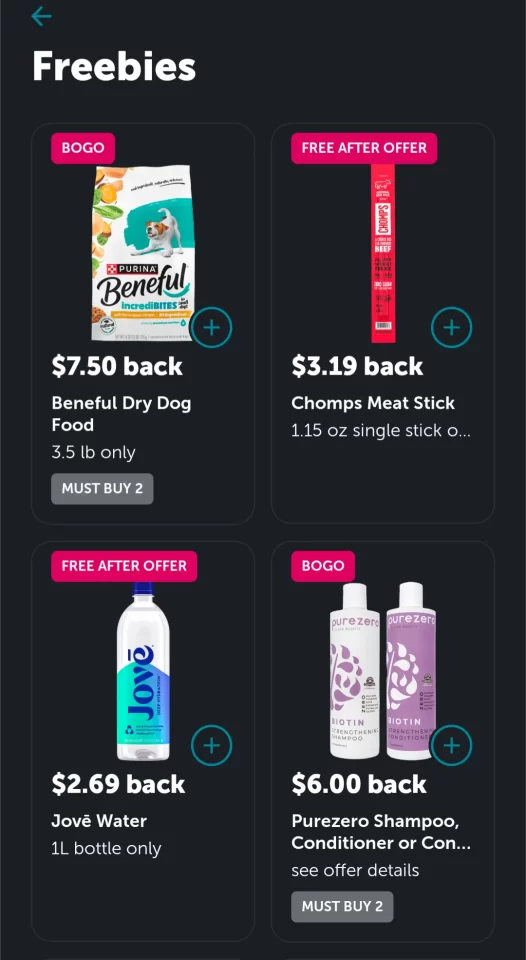
The best overall discount app is Ibotta. You can download it from either the Google Play or Apple store for free. After creating an account, (which requires basic info such as your name, date of birth, email, and phone number) you will see hundreds of offers from all sorts of brands. Most of these will just be for a small amount and not cover the price of the item. However, there is a section at the bottom of the app’s home page that is called “Free. Get 100% Back” or similar (wording may vary). Alternatively, you can access these deals by typing in “freeibotta” into the search. This page will show all offers that will get you free items or buy one get one (bogo) items. On the top of the item image it will say Free After Offer or BOGO. If it says Free After Offer, you will get 100% of the purchase price back. However, pay attention to the dollar amount you will get back when purchasing the item. On rare occasions the price is higher in store, and depending on your state you may be charged a tax. In these cases you would end up paying a little out of pocket as the rebate won’t cover the full amount. This doesn’t usually happen though. Ibotta is also great for easily receiving money back for purchases you were planning on making too. After you make your purchase just search the names of the items in Ibotta and see if there are any rebates.
Tip: Make sure to either cash out or keep using the app within 180 days. If you don’t submit any receipts and leave a balance in Ibotta they will start deducting $3.99 from it every month until you scan a receipt or have no balance left. This has never happened to me because there are so many brands and deals that I always get something back after going to the grocery store.
Sign Up Bonus Code: kodobah will get you a $5 sign up bonus. Enter this when prompted during the sign up process
Where to download: Google Play, Apple Store
Minimum Cash out: $20
Cash Out Options: Bank Account, Paypal, or Gift Card.
Note: Do not try making multiple accounts or they will ban you and it is not possible to get that reversed.
Fetch Rewards
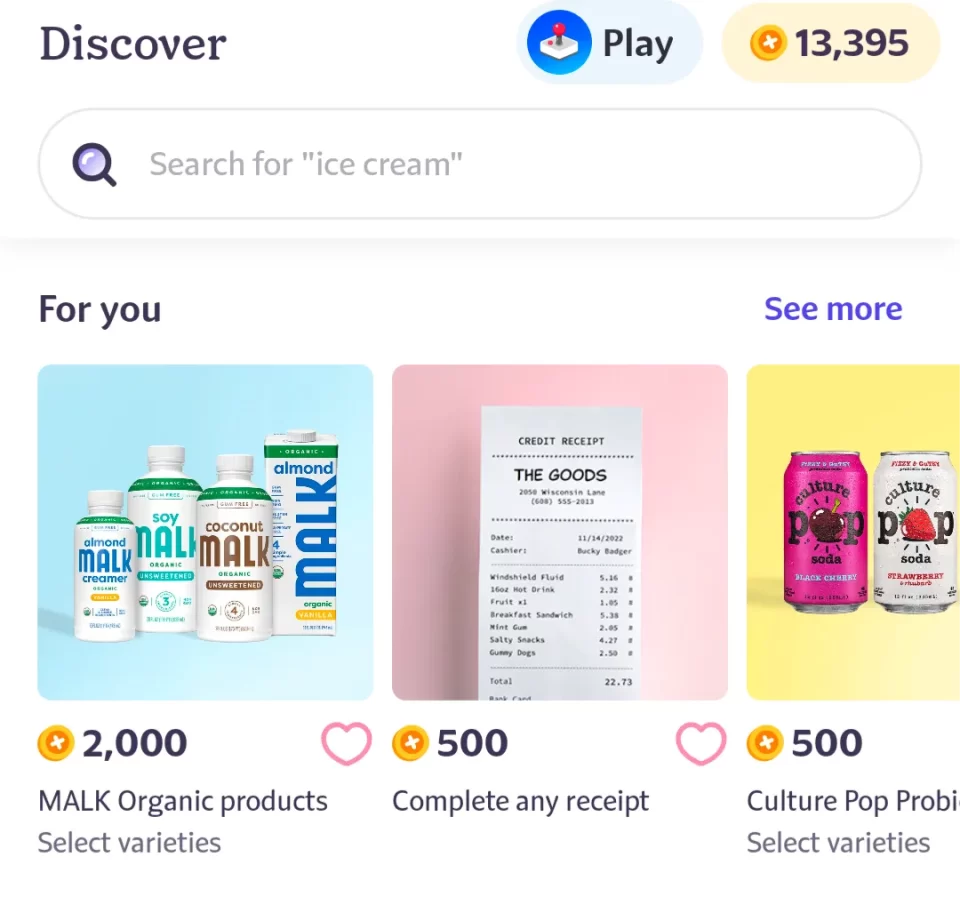
Fetch rewards is another receipt scanning app that gives out almost free items. It is different from Ibotta (where you need to add the offers before submitting the receipt). Instead, you submit the receipt and then the app will tell you what offers are available based on your purchases and automatically give you the earnings. However, I recommend you be aware of the offers you should be getting points for as this app’s algorithm frequently misses them. Their customer service has always fixed it for me in under 30 minutes. I recommend going into the app and choosing to sort by “High to Low”. This will put any free offers at the top of the list. Free offers are denoted by “100% back” and will give you 1,000 points for every dollar spent on the item.
The other thing about Fetch is that it works on a point system and not directly with cash. You can only cash out for gift cards, but they have good ones like Amazon and Walmart. Previously 1000 points always equaled $1. However, they have recently devalued their points a bit for good redemptions such as Amazon. For example, it takes 28K points to get a $25 Amazon gift card when previous it would have only been 25K. Another difference is that you will get a small amount of money (a couple of cents) for scanning any receipt, regardless of offers. Therefore free offers really still cost a small amount of money.
Sign Up Bonus Code: Make sure to use a referral code when signing up as this will get you a little extra money after your first receipt scan. It will ask you if you would like to input a code during the signup process. If your friends or family already have an account, use theirs. Otherwise here is a code BN13MV.
Where to download: Google Play, Apple Store
Minimum Cash out: 3,000 points (roughly $3)
Cash Out Options: Only gift cards. A large variety such as Amazon, Walmart, Target, and More
Shopkick
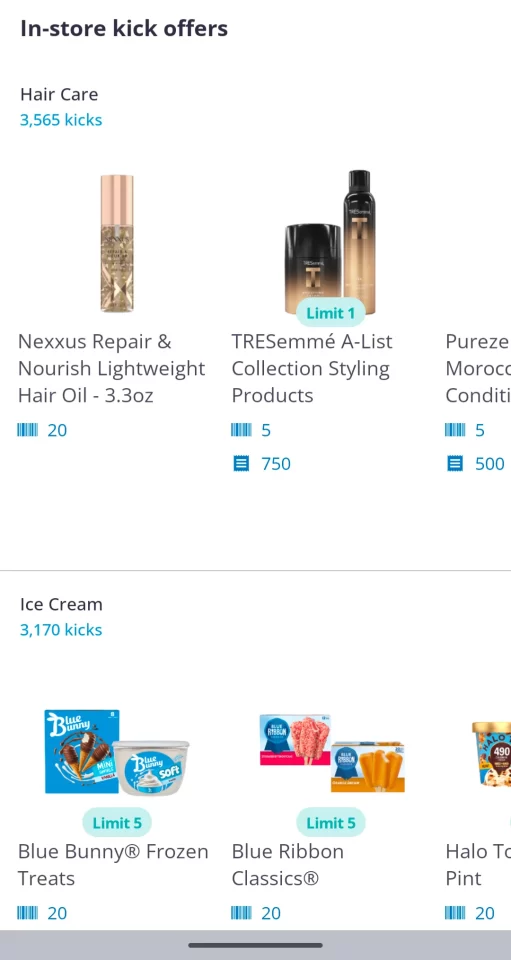
Shopkick is a mobile app that allows users to earn rewards and gift cards for shopping at participating retailers, both online and in-store. The app works by awarding “kicks,” or points, to users for various actions, such as walking into a store, scanning items, making purchases, and watching advertising videos listed in the app. These kicks can be redeemed for cash via Paypal or gift cards to popular retailers like Amazon, Target, and Starbucks. Shopkick occasionally has something for free. However, it is used more often as an app to stack deals. Stacking deals means completing rebates for the same product but on different apps (submit the same receipt to both Shopkick and Ibotta for example). This allows you to get a lot more cash back for the same purchase.
Shopkick’s differentiator is that you can get points for just walking into a store or scanning the barcode of a product on the shelf in the store. In order to use Shopkick, you would first look up the store you are planning on going to and check to see if there are any deals (they usually just have a few).
Once you decide to complete a deal, you go to the store, scan the product barcode in the store (not required but gives you some extra points), purchase the item, and then submit the receipt like the other apps. This app’s payment system is in points “Kicks” , and not direct cash. 250 “Kicks” is equal to $1.
Sign Up Bonus Code: Make sure to use a referral code when signing up as this will get you a little extra money after your first receipt scan. It will ask you if you would like to input a code during the signup process. If your friends or family already have an account, use theirs. Otherwise here is a code JOY213122.
Where to download: Google Play, Apple Store
Minimum Cash out: 500 kicks ($2), $10 for direct cash (via Paypal)
Cash Out Options: Paypal, Gift Cards – A large variety such as Amazon, Walmart, Target, and More
Best Overall Grocery Rebate App: Ibotta
Looking for the most reliable grocery rebate app? Ibotta stands out as the top choice for turning receipts into rewards. It has by far the most overall deals, and the most high value deals like totally free or BOGO. It has an easy to use interface, and allows you to cash out to actual cash, and not just gift cards like Fetch. The higher value rewards make it easy to reach the $20 cash out minimum. If you had to download just 1 grocery rebate app, you should start with Ibotta.